---
title: Endorsement in Power BI, Part 2, How to Endorse? - BI Insight
description: Power BI isn't just a report-authoring tool, it's much more than that. Part 2 focuses on how to enable certification and how to certify.
image: https://www.datavizioner.com/hubfs/governance-part2.png
---
[](https://www.datavizioner.com)
- [Platform](https://www.datavizioner.com/platform)
## [Platform at a glance ](https://www.datavizioner.com/platform)
##### **[Watch: Platform Overview](https://www.loom.com/share/aead85255d474aa8976a2849e5a0846a)**
### [Enhance governance Build trust in your data and navigate regulatory requirements.](https://www.datavizioner.com/platform)
### [Power BI Documenter Document, review and improve your Power BI reports and models.](https://www.datavizioner.com/power-bi-documenter)
### [Explore lineage Improve accuracy and identify issues before they cost you.](https://www.datavizioner.com/platform)
### [Power BI Exporter Easily export data from Power BI with a single click - completely free.](https://www.datavizioner.com/power-bi-exporter)
### [Automate documentation Save time with efficient enterprise and self-service collaboration.](https://www.datavizioner.com/platform)
### [Additional connectors Integrate datasets, reports and dashboards from other sources.](https://www.datavizioner.com/additional-connectors)
- [Services](https://www.datavizioner.com/services)
- [Resources](https://www.datavizioner.com/resources)
## [Get help and updates ](https://www.datavizioner.com/resources)
##### **[Watch: Self-service BI, and its perils](https://www.loom.com/share/4b577b30913e433f8f07642d25a85877)**
### [Insights Keep on top of the latest trends in data and business intelligence.](https://www.datavizioner.com/resources)
### [Case studies See how customers are managing risks and improving productivity.](https://www.datavizioner.com/resources/tag/case-studies)
### [Product updates Hear about the latest updates and learn how to leverage them.](https://www.datavizioner.com/resources/tag/product-updates)
### [Partners Find a partner to augment your internal team's capabilities.](https://www.datavizioner.com/partners)
### [Support Get in touch with our friendly team, and we'll help you out.](https://www.datavizioner.com/contact)
- [Pricing](https://www.datavizioner.com/pricing)
- [Enterprise](https://www.datavizioner.com/pricing/enterprise-government)
[Login](https://app.datavizioner.com/) [START FOR FREE](https://app.datavizioner.com/signup)
Governance
# Endorsement in Power BI: How to endorse
Power BI isn't just a report-authoring tool, it's much more than that. Part 2 focuses on how to enable certification and how to certify.

In the [previous post](https://www.datavizioner.com/resources/content-endorsement-in-power-bi-part-1-the-basics) I explained the basic concepts around endorsement in Power BI. We discussed that users’ ability to collaborate in creating and sharing artifacts is one of the key aspects of users’ experience in Power BI. But it would be hard, if not impossible, to identify the quality of the artifact without a mechanism to identify the artifact’s quality in large organisations.
Endorsement is the answer to this challenge. We discussed the following in the previous post:
### How do Power BI administrators enable certification and grant rights to security groups?
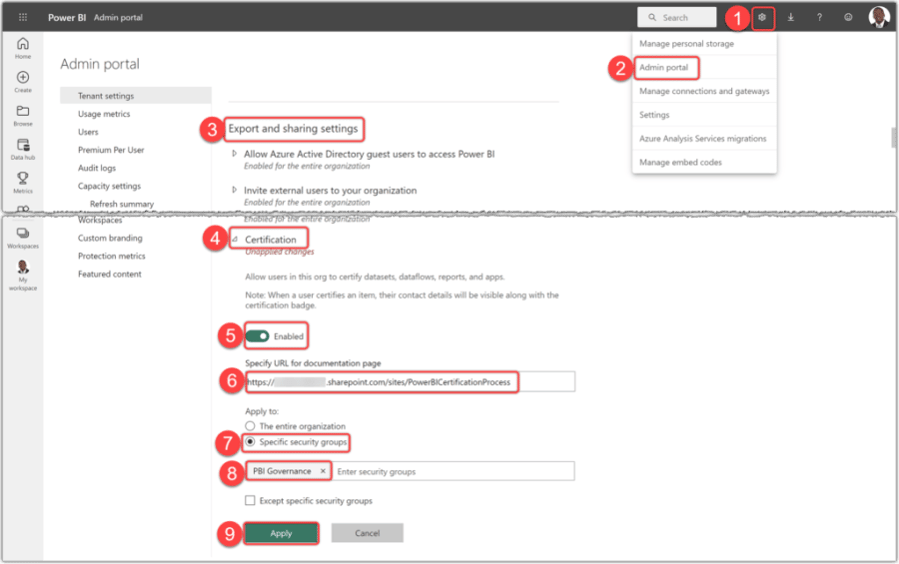
In the previous post, we discussed that a Power BI administrator must enable certification and grant sufficient rights to the security groups. Therefore, all members of the specified security group are authorised to certify the artifacts. If you are a Power BI administrator, follow these steps to do so:
1. After logging into Power BI Service, click the **Settings** button
2. Click Admin Portal
3. From the **Tenant settings**, scroll down to find the **Export and sharing settings**
4. Find and expand the **Certification** setting
5. **Enable** certification
6. Put the certification process documentation URL (if any)
7. It is not recommended to enable this feature for the entire organisation. So, select the **Specific security groups** option
8. Type the security group name and select it from the list
9. Click the **Apply** button
The following image shows the above steps:
[](https://static.hsstatic.net/BlogImporterAssetsUI/ex/missing-image.png)
Enabling certification from the Admin Portal in Power BI Service
It may take up to 15 minutes for the changes to go through. After that, all the members of the specified security can certify the artifacts. In the next section, we see how to certify the supported artifacts.
***Note***
*Everyone who has “write” permission on the Workspace containing the artifact* *can promote it. Therefore, the users or security groups with one of the **Admin**, **Member**, or **Contributor** [roles in the Workspace](https://learn.microsoft.com/en-us/power-bi/collaborate-share/service-roles-new-workspaces?WT.mc_id=DP-MVP-5003466#workspace-roles) can promote the artifacts.*
*However, one should not promote the artifacts* *just because he/she can. The organisations usually have a promotion process to follow, but the boundaries around promoting are often much more relaxed than certifying it.*
### How to certify the artifacts?
As explained in the[previous blog](https://www.biinsight.com/content-endorsement-in-power-bi-part-1-the-basics/#supporting-contents), the following artifacts correctly support certification:
- Datasets
- Dataflows
- Reports
- Apps
Unfortunately, the endorsement currently does not support dashboards. Now, let’s see how the authorised users can certify different artifacts.
#### Certifying datasets
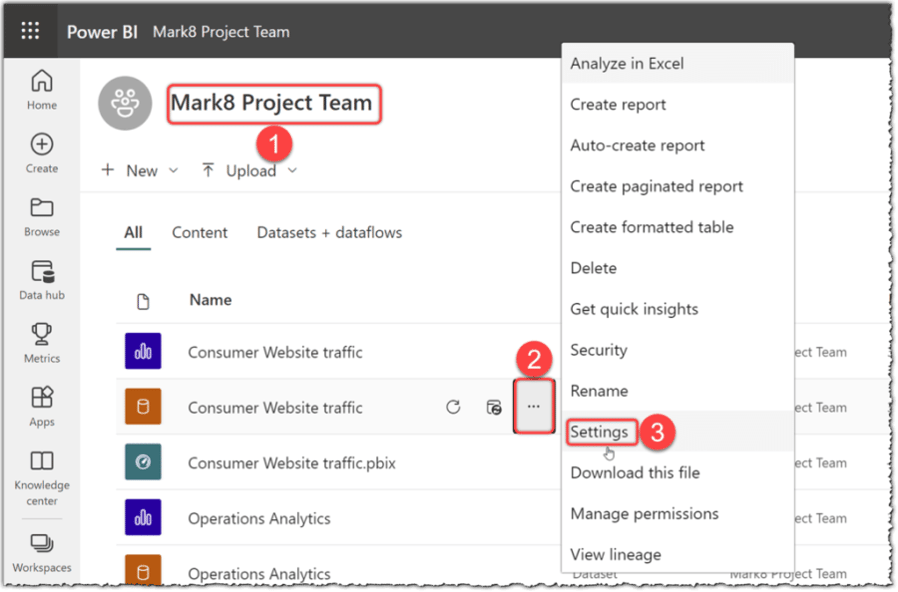
Follow these steps to certify a dataset:
1. Navigate to the desired Workspace
2. Hover over the desired dataset and click the ellipsis button
3. Click **Settings**
[](https://static.hsstatic.net/BlogImporterAssetsUI/ex/missing-image.png)
Navigating to the dataset settings in Power BI Service
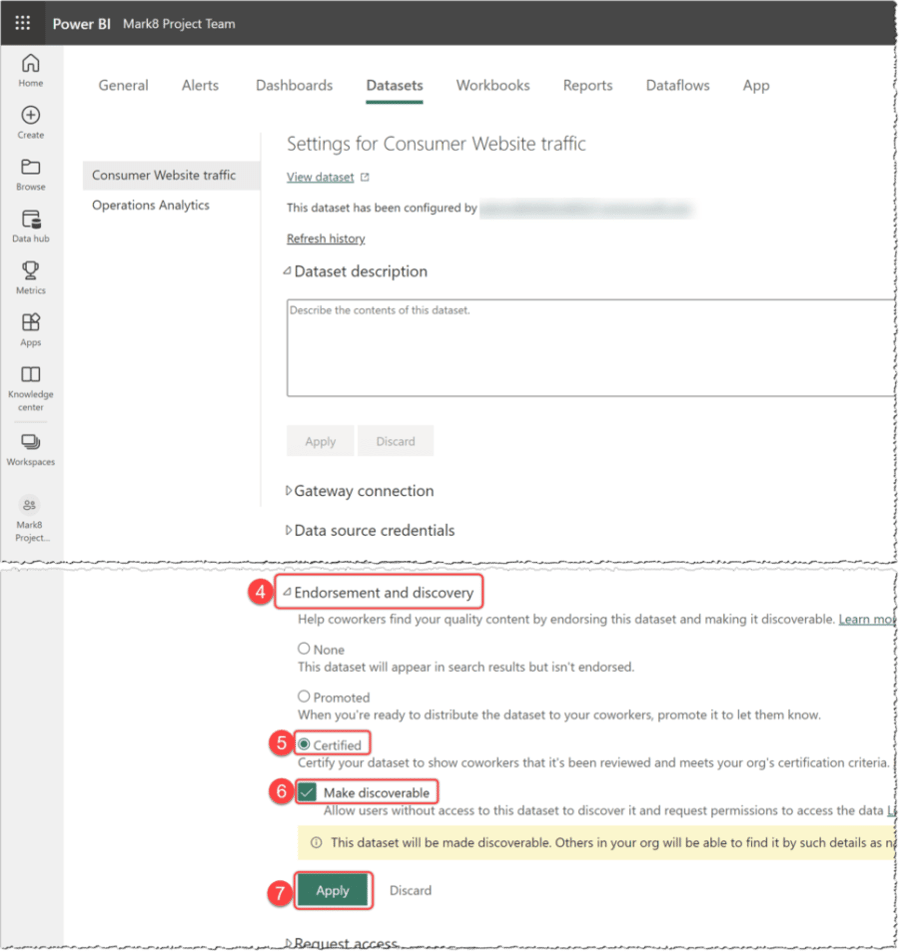
1. Expand the **Endorsement and discovery**
2. Click the **Certified** option
3. You can make the dataset discoverable for the users without access by clicking the **Make discoverable** option
4. Click **Apply**
[](https://static.hsstatic.net/BlogImporterAssetsUI/ex/missing-image.png)
Certifying a dataset in Power BI Service
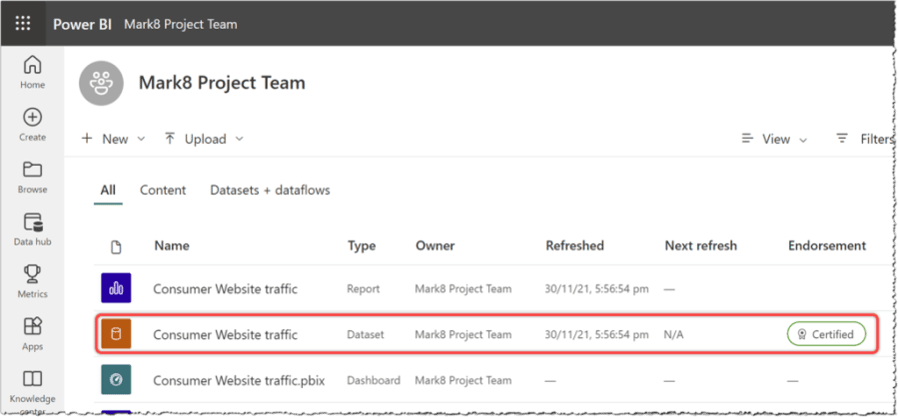
As the following image shows, the dataset gets the **Certified** badge afterward.
[](https://static.hsstatic.net/BlogImporterAssetsUI/ex/missing-image.png)
A certified dataset in Power BI Service
#### Certifying Dataflows
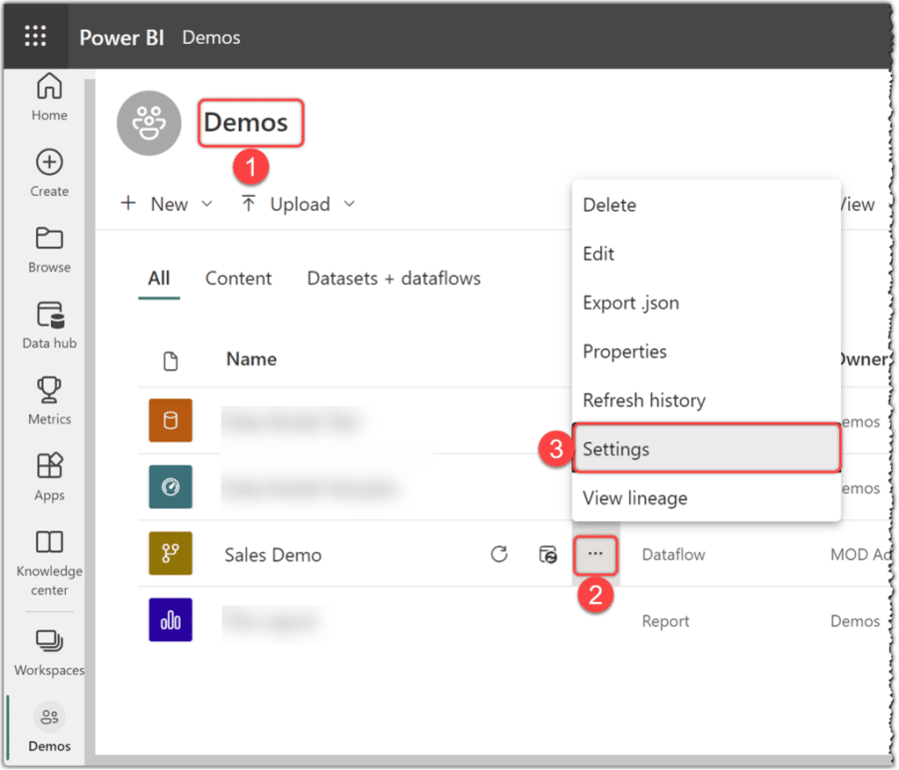
Follow these steps to certify a dataflow:
1. Navigate to the desired Workspace
2. Hover over the desired report and click the ellipsis button
3. Click **Settings**
[](https://static.hsstatic.net/BlogImporterAssetsUI/ex/missing-image.png)
Navigating to dataflow settings in Power BI Service
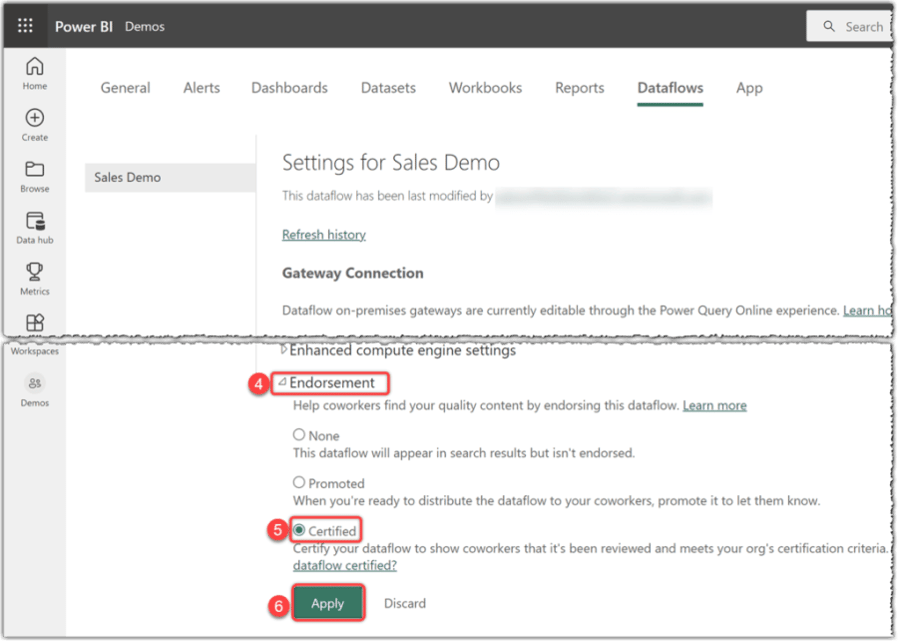
1. Expand the **Endorsement** section
2. Click the **Certified** option
3. Click **Apply**
[](https://static.hsstatic.net/BlogImporterAssetsUI/ex/missing-image.png)
Certifying dataflow in Power BI Service
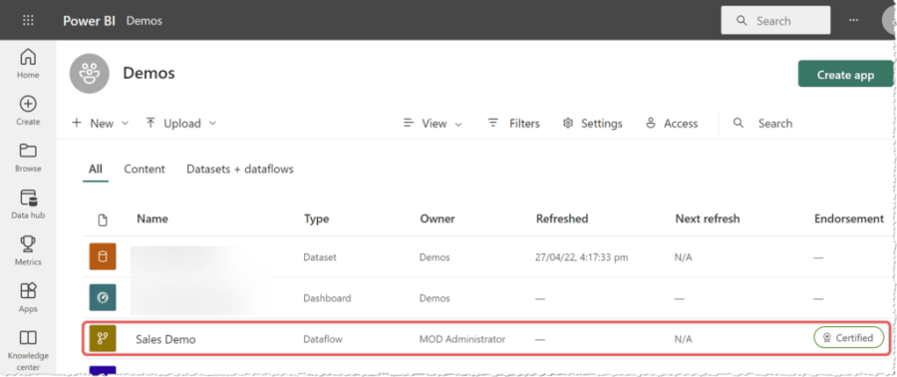
As the following image shows, the dataflow gets the **Certified** badge after getting certified:
[](https://static.hsstatic.net/BlogImporterAssetsUI/ex/missing-image.png)
A certified dataflow in Power BI Service
#### Certifying Reports
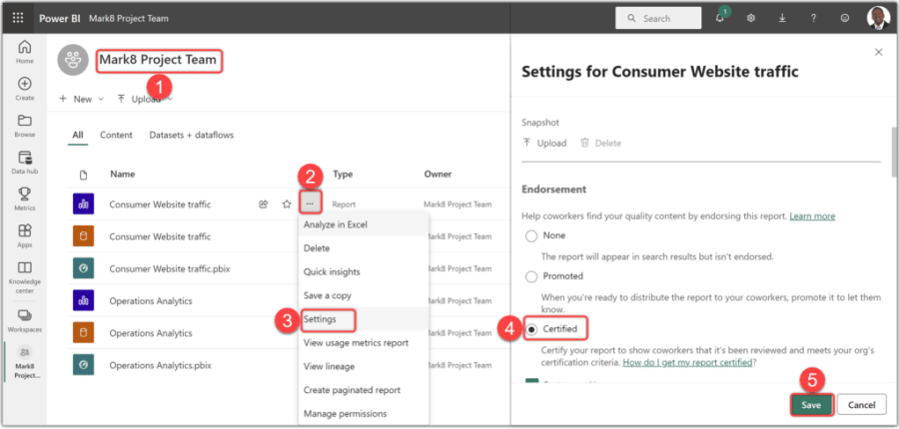
Follow these steps to certify a report:
1. Navigate to the desired Workspace
2. Hover over the desired dataflow and click the ellipsis button
3. Click **Settings**
4. Select the **Certified** option from the **Endorsement** section
5. Click **Save**
[](https://static.hsstatic.net/BlogImporterAssetsUI/ex/missing-image.png)
Certifying reports in Power BI Service
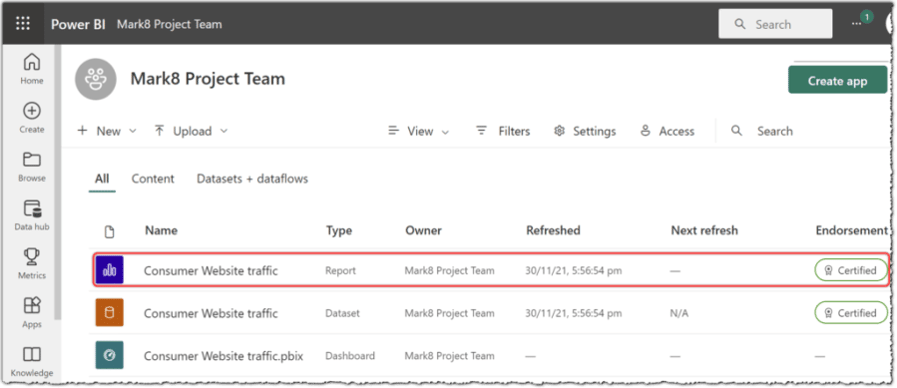
The certified reports get the **Certified** badge, as shown in the following image:
[](https://static.hsstatic.net/BlogImporterAssetsUI/ex/missing-image.png)
The certified report in Power BI Service
#### Certifying Apps
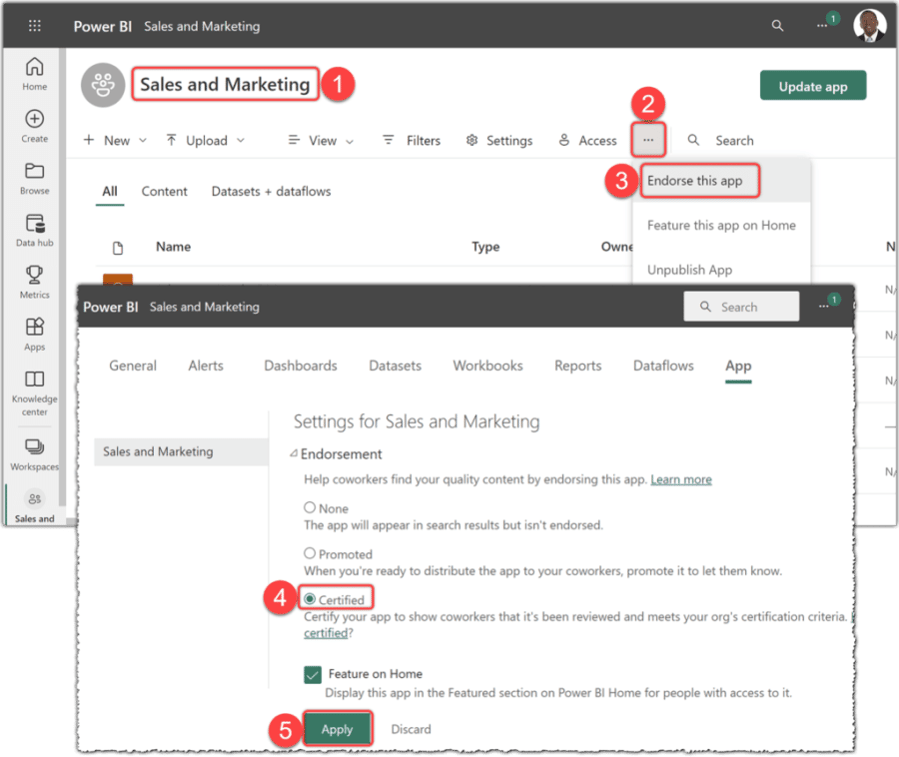
Follow these steps to certify an App:
1. Navigate to a Workspace containing the App
2. Click the **More options** ellipsis button
3. Click **Endorse this app**
4. Click **Certified**
5. Click **Apply**
[](https://static.hsstatic.net/BlogImporterAssetsUI/ex/missing-image.png)
Certifying an App in Power BI Service
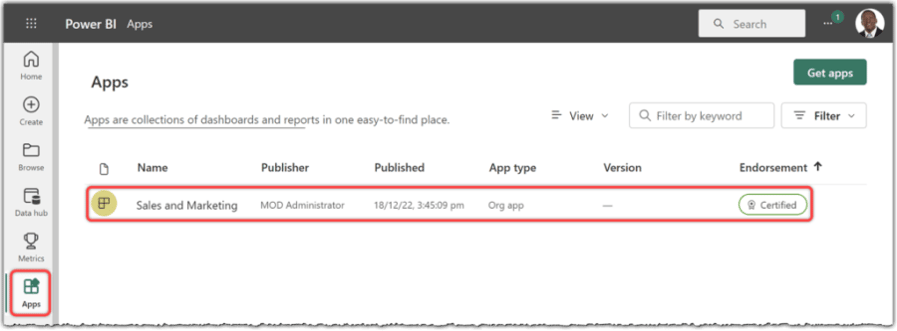
The certified app gets the **Certified** badge visible in the Apps section in Power BI Service. The following image shows the certified Sales and Marketing app:
[](https://static.hsstatic.net/BlogImporterAssetsUI/ex/missing-image.png)
A certified App in Power BI Service
In this post, we learnt how to enable certification for a security group and how to certify the artifacts. Perhaps, you already noted the **Promoted** option in the images that we can choose to promote the artifacts instead of certifying.
In the next post of this series, we dig deeper into the certification processes. So stay tuned.
LEADING DATA INTELLIGENCE PLATFORM
Enhance governance, accelerate analysis and automate documentation with a single data intelligence platform.
[GET A FREE ACCOUNT](http://app.datavizioner.com/signup)
EBOOK
## Get our free ebook on how you can level up your B2B SaaS content marketing
Get our free ebook on how you can level up your B2B SaaS content marketing
[Soheil Bakhshi](https://www.datavizioner.com/resources/author/soheil-bakhshi)
3 May 2024
[mailto:?subject=Check%20out%20https://www.datavizioner.com/resources/content-endorsement-in-power-bi-part-2-endorsing-contents&utm_medium=social&utm_source=email%20&body=Check%20out%20https://www.datavizioner.com/resources/content-endorsement-in-power-bi-part-2-endorsing-contents&utm_medium=social&utm_source=email](mailto:?subject=Check%20out%20https://www.datavizioner.com/resources/content-endorsement-in-power-bi-part-2-endorsing-contents&utm_medium=social&utm_source=email%20&body=Check%20out%20https://www.datavizioner.com/resources/content-endorsement-in-power-bi-part-2-endorsing-contents&utm_medium=social&utm_source=email)
## Similar posts
Governance
### [Endorsement in Power BI - The Basics](https://www.datavizioner.com/resources/content-endorsement-in-power-bi-part-1-the-basics)
Power BI isn't just a report-authoring tool, it's much more than that. Part 1 focuses on the basics of endorsement in Power BI.
Soheil Bakhshi Apr 13, 2024
Governance
### [Power BI Governance Part 1: Multiple environments, data source certification and documentation](https://www.datavizioner.com/resources/power-bi-governance-best-practices-part-1-multiple-environments-data-source-certification-and-documentation)
This post explains three best practices for Power BI governance: multiple environments, data source certification and documentation.
Soheil Bakhshi Apr 4, 2020
Blog
### [Top three Power BI best practices for implementation 2020](https://www.datavizioner.com/resources/top-power-bi-best-practices-for-implementation-2020)
Power BI is taking off, and it’s fast becoming the most popular business intelligence platform on the market.
Data Vizioner Mar 30, 2020

Industry leading data intelligence to enhance governance, explore lineage and automate documentation across your organization.
### Popular
- [Platform](https://www.datavizioner.com/platform)
- [Services](https://www.datavizioner.com/services)
- [Pricing](https://www.datavizioner.com/pricing)
- [Enterprise](https://www.datavizioner.com/pricing/enterprise-government)
### Products
- [Power BI Documenter](https://www.datavizioner.com/power-bi-documenter)
- [Power BI Exporter](https://www.datavizioner.com/power-bi-exporter)
- [Power BI Service Connector](https://www.datavizioner.com/additional-connectors)
- [Analysis Services Connector](https://www.datavizioner.com/resources/connect-to-analysis-services)
### Resources
- [Insights](https://www.datavizioner.com/resources)
- [Case studies](https://www.datavizioner.com/resources/tag/case-studies)
- [Product updates](https://www.datavizioner.com/resources/tag/product-updates)
- [Partners](https://www.datavizioner.com/partners)
### Support
- [10 minute overview](https://www.datavizioner.com/power-bi-documenter)
- [Specialist support](https://www.datavizioner.com/contact)
- [Upgrade account](https://www.datavizioner.com/contact)
- [Become a partner](https://www.datavizioner.com/partner-program)
Copyright © 2026 Data Vizioner Limited | [Privacy Policy](https://get.datavizioner.com/privacy-policy) | [Terms of Use](https://get.datavizioner.com/terms-of-use)
```json
{
"@context" : "https://schema.org",
"@type" : "BlogPosting",
"author" : {
"@type" : "Person",
"name" : "Soheil Bakhshi",
"url" : "https://www.datavizioner.com/resources/author/soheil-bakhshi"
},
"dateModified" : "2025-04-13T10:11:40.192Z",
"datePublished" : "2024-05-03T16:30:00.000Z",
"headline" : "Endorsement in Power BI, Part 2, How to Endorse? - BI Insight",
"image" : [ "https://www.datavizioner.com/hubfs/governance-part2.png" ],
"mainEntityOfPage" : {
"@id" : "https://www.datavizioner.com/resources/content-endorsement-in-power-bi-part-2-endorsing-contents",
"@type" : "WebPage"
},
"publisher" : {
"@type" : "Organization",
"logo" : {
"@type" : "ImageObject",
"url" : "https://www.datavizioner.com/hubfs/at-2.png"
},
"name" : "Data Vizioner"
}
}
```